TotalAV explained: what a consumer security suite actually does
TotalAV is one of the better-known consumer security subscriptions. This guide explains the category it belongs to — how the protection works, which parts of the bundle are genuinely additional, and what to read on the vendor’s own site before you pay.
Advertising disclosure
This is an advertisement-funded page. The buttons below are partner links. If you follow one and subscribe, the seller pays us a commission. You pay exactly the same price as you would going directly — the commission comes out of the seller’s margin, not your pocket.
We are not paid to reach a particular conclusion, and no advertiser sees this page before it is published. What that means in practice is set out in our editorial policy and advertising disclosure.
This page is not written by TotalAV. sorentis.online is an independent publisher with no affiliation to, endorsement from or sponsorship by TotalAV. Where anything here differs from the vendor’s own current information, the vendor’s information is the one that counts.
1. What TotalAV is, and what “suite” means
TotalAV is a subscription consumer security product for desktop and mobile devices. Like most products sold today under the word “antivirus”, it is not a single program. It is a suite: a malware detection engine packaged together with a set of adjacent tools, sold as one annual subscription and managed from one dashboard.
That packaging is the defining feature of the category, and it is where most of the confusion about these products comes from. When two suites are compared on price, they are often not selling the same set of things at all. So the useful question is rarely “is this antivirus good?” It is “which parts of this bundle do I not already have, and are those parts worth the difference?”
What this article deliberately does not contain
No score out of ten, no star rating, no list of plan prices and no device limits. Those change without notice, and a number reproduced here would be out of date within weeks. Plan names, device counts, feature availability and prices are on the vendor’s own site, and that is the version that binds you at checkout.
2. How malware detection actually works
Every mainstream security product, TotalAV included, layers several detection methods on top of one another. They are described below in the order a suspicious file normally meets them. Each layer exists because the one before it has a specific blind spot.
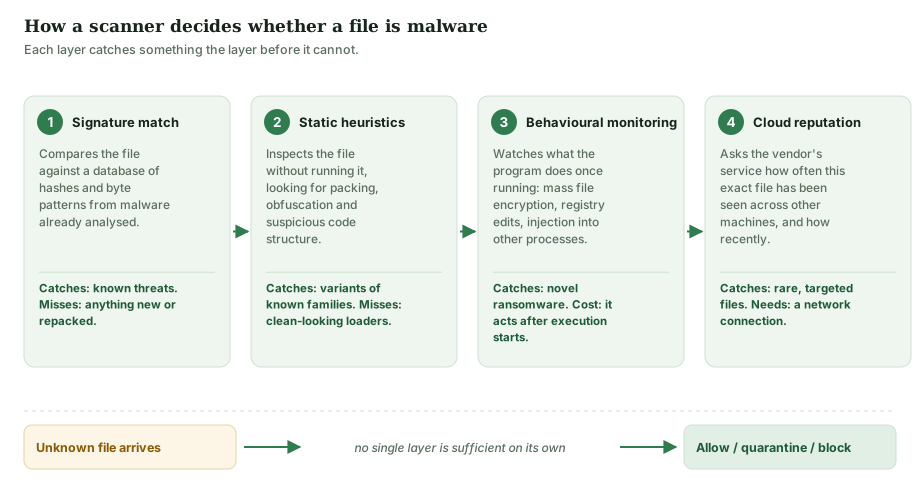
Signature matching compares a file against a database of patterns taken from malware that analysts have already examined. It is cheap, fast and completely reliable for threats that are already known — and completely blind to anything that is not. Repacking an existing piece of malware is often enough to defeat it, which is why it has not been the only layer in any serious product for a very long time.
Static heuristics examine the file without running it, looking for the structural signs of something hiding its purpose: packing, obfuscation, suspicious imports, code that rewrites itself. This generalises to new variants of a known family, at the cost of occasionally flagging legitimate software that happens to use the same protective techniques.
Behavioural monitoring watches what a program does once it is running: opening and rewriting hundreds of documents in sequence, injecting code into another process, altering boot configuration. This is the layer that catches ransomware nobody has ever seen before. The trade-off is inherent to the method — the program has to start doing something before there is anything to detect, so the defence is about stopping the damage early rather than preventing it entirely.
Cloud reputation asks the vendor’s servers how common a given file is across the whole installed base. A binary that exists on millions of machines and has done for years is treated differently from one first seen forty minutes ago on eleven computers. This layer needs a working network connection, and it is one reason security software talks to its vendor continuously.
3. What independent laboratories measure
Marketing copy in this industry — on every vendor’s site, not just one — leans heavily on test results. The results themselves are public, and they are more informative than any summary of them, including this one.
The three laboratories whose consumer testing is most widely referenced are AV-TEST in Germany, AV-Comparatives in Austria and SE Labs in the United Kingdom. All three publish their methodology alongside their results. Their testing practices are governed by a shared standard from the Anti-Malware Testing Standards Organization (AMTSO).
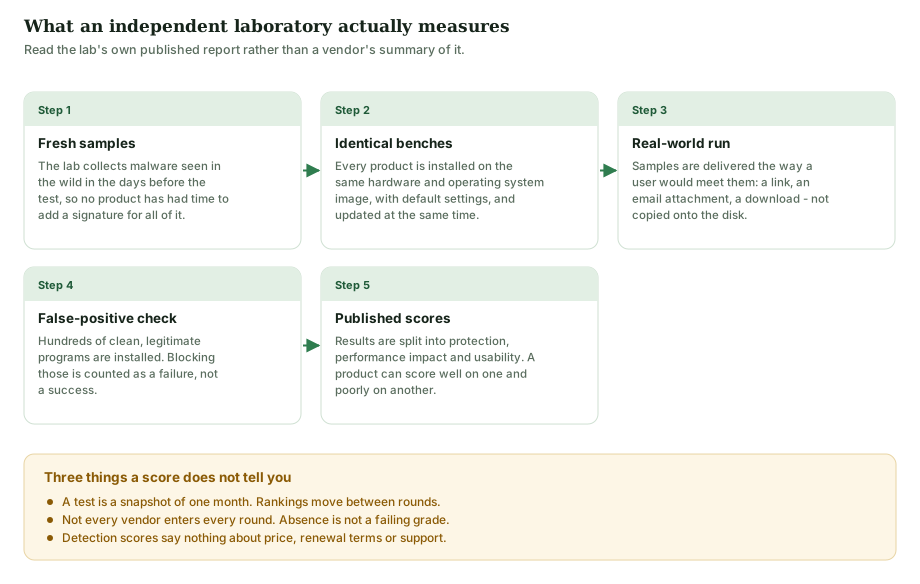
Two points are worth holding on to when you read any of these reports. The first is that a result is a snapshot. Tests run in monthly or quarterly rounds, and the ordering changes between rounds. A product that leads one round may sit mid-table in the next without anything meaningful having happened.
The second is that not every vendor enters every round. Participation is voluntary and, in some programmes, paid for. A product absent from a table has not failed the test; it was not in it. Any page — including this one — that tells you a product is “consistently top-rated” without linking you to the round, the date and the methodology is asking you to take its word for something you could check in two minutes.
What we removed from the earlier version of this page
An earlier version of this article stated that independent laboratories had “consistently ranked TotalAV among the top performers” and that it “often scored 100% in real-world protection tests”. We could not substantiate either claim against a specific published test round, so both have been removed rather than re-sourced. The full list of changes is in section 13.
Advertisement. We are paid a commission if you subscribe after following this link, at no extra cost to you. We recommend checking the laboratories' own published reports as well as the vendor's summary of them.
4. What is in the bundle — and what you already have
This is the section most worth your time. A suite is a bundle, and a bundle is only worth its price if you are not already paying for the contents in some other way — including by already owning them for free.
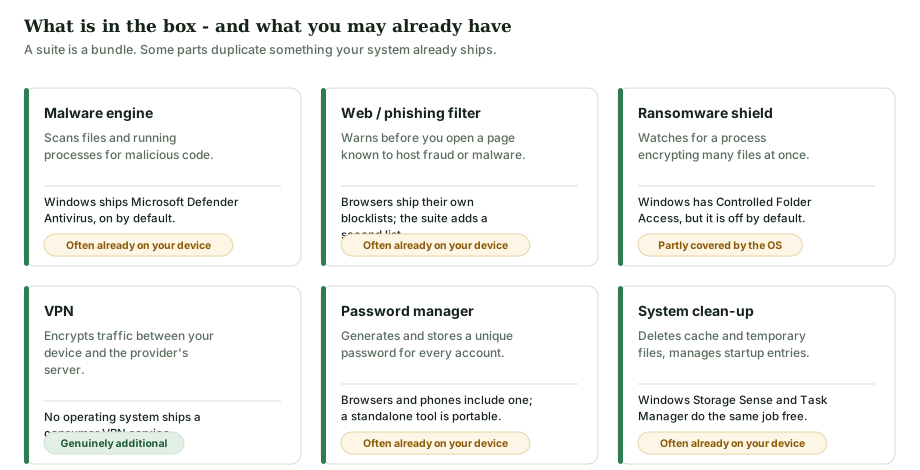
Some concrete points behind that diagram:
- Windows has shipped an antivirus since Windows 8. Microsoft Defender Antivirus is built in, enabled by default, and updated through Windows Update. It participates in the independent laboratory tests described above and generally performs respectably in them. Installing a third-party engine normally causes Defender to step aside automatically.
- macOS has XProtect and Gatekeeper, which check downloaded software against Apple’s own list and enforce code signing. They run silently and have no user interface to speak of, which is why many people do not know they exist.
- Android has Google Play Protect, which scans installed applications on the device.
- Browsers ship their own blocklists. Chrome, Edge, Firefox and Safari all warn before loading a page known to host fraud or malware.
None of this makes a paid suite pointless. A second opinion from a different vendor catches different things; the interface is better; and the bundled extras — particularly the password manager — are real value for people who would not otherwise use one. But it does change the comparison. You are not choosing between “protected” and “unprotected”. You are choosing between the free baseline you already have and a paid layer on top of it.
5. The VPN: what it hides and what it does not
The bundled VPN is the component most often oversold, across the whole industry. Here is the accurate version.
A VPN builds an encrypted tunnel between your device and a server run by the VPN provider. Traffic inside that tunnel is unreadable to anyone watching the network segment you are physically on — a cafe’s Wi-Fi, a hotel router, your internet provider. The website you visit sees the VPN server’s address instead of yours.
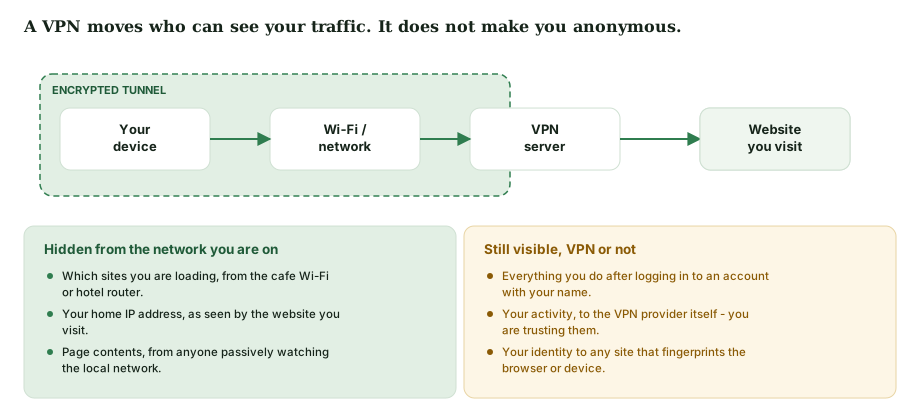
What it does not do:
- It does not make you anonymous. This is the important correction. The moment you sign in to any account — mail, a shop, a social network — you have identified yourself, and the VPN is irrelevant to everything that follows.
- It moves trust rather than removing it. Your traffic is hidden from your internet provider and handed to the VPN provider instead. You are now trusting that company’s logging policy.
- It does not stop browser fingerprinting, tracking pixels, or anything else that identifies a device by its characteristics rather than its address.
- It does not protect you from malware. An encrypted tunnel carries a malicious download just as faithfully as a legitimate one.
A VPN is genuinely useful for its actual purpose: keeping your browsing private from the network operator, particularly on networks you do not control. That is a real benefit. It is a narrower one than the word “anonymity” suggests.
6. The password manager
Of everything in a typical suite, the password manager is the component that prevents the most damage per euro, and it is the one most people ignore.
The reason is the way real account compromises happen. Most do not begin with someone targeting you. They begin with a breach at some unrelated service you signed up to years ago. Attackers take the recovered address-and-password pairs and replay them automatically against hundreds of other sites. This is called credential stuffing, and it works for exactly one reason: password reuse.
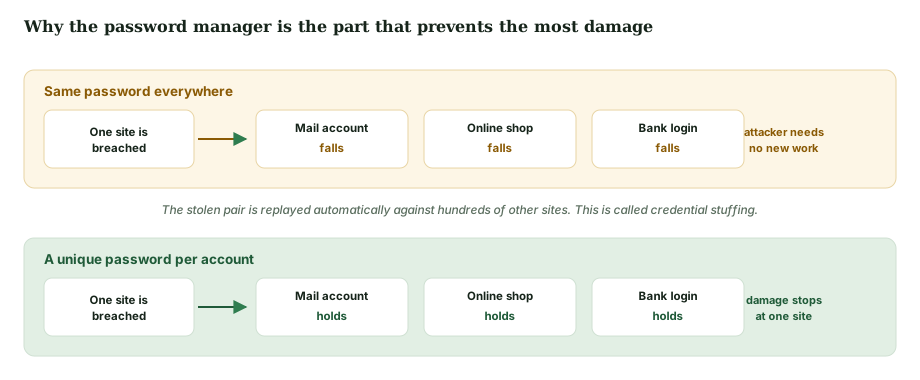
A password manager makes unique passwords practical, because you no longer have to remember any of them. Whether you use the one bundled in a security suite, the one already built into your browser or phone, or a standalone product matters far less than using one at all.
Worth doing today, at no cost
Check whether an address of yours has appeared in a known breach at Have I Been Pwned, a long-running free service maintained by the security researcher Troy Hunt. Then turn on two-factor authentication for your email account first — it is the account that can reset all the others.
7. “System optimisation”, honestly described
Most suites include a clean-up or optimisation module, and TotalAV is no exception. It is worth being precise about what these tools do, because it is the part of the bundle with the widest gap between marketing language and mechanism.
What they actually do is well understood and genuinely useful in a limited way: delete browser caches and temporary files, empty the recycle bin, find large forgotten files, and list the programs configured to launch at startup so you can disable the ones you do not need. Disabling unnecessary startup programs can measurably shorten boot time on a machine that has accumulated a lot of them.
What they cannot do is make a computer faster than it was when new. Freeing disk space does not increase processor speed. On modern solid-state storage, defragmentation is unnecessary and the operating system manages it. And “registry cleaning”, where offered, has no measurable performance benefit on any current version of Windows — Microsoft has not recommended it for many years.
Windows ships Storage Sense for automatic cleanup and Task Manager’s Startup tab for startup control. Both are free and do the core of this job. A suite’s version is more convenient, not more capable.
A claim we removed
The earlier version of this page said the optimisation module “has been reported by users to noticeably improve boot times and free up several gigabytes of disk space”. There were no such reports — the sentence was invented, and the figure with it. Both are gone. See section 13.
8. The same subscription on four platforms
A multi-device licence covers several devices, but it does not do the same work on each. What security software is permitted to do is decided by the operating system, not by the vendor.
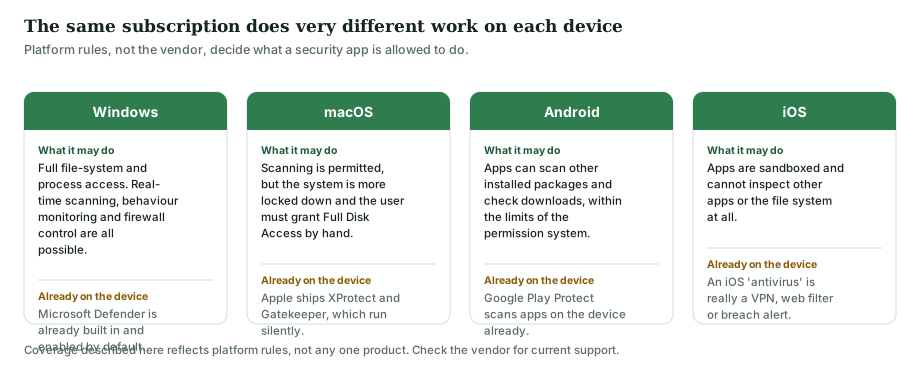
The iOS column is the one that surprises people. Apple’s sandbox prevents any app from inspecting other apps or the wider file system, so a conventional virus scanner is not technically possible on iPhone or iPad. What security vendors ship for iOS is a combination of a VPN, a web-filtering profile, a data-breach alert service and device-location tools. Those are useful things. They are not virus scanning, and any product page implying otherwise on iOS is describing something the platform does not permit.
9. Introductory pricing and automatic renewal
This is the part of the purchase that generates the most complaints, and it is an industry-wide pattern rather than anything specific to one brand.
Consumer security software is typically sold with a heavily discounted first term. That term then renews automatically at the standard price, which is normally considerably higher than the introductory one. This is lawful and disclosed — but it is disclosed in the terms, not in the headline price, and a great many people are surprised by the second invoice.
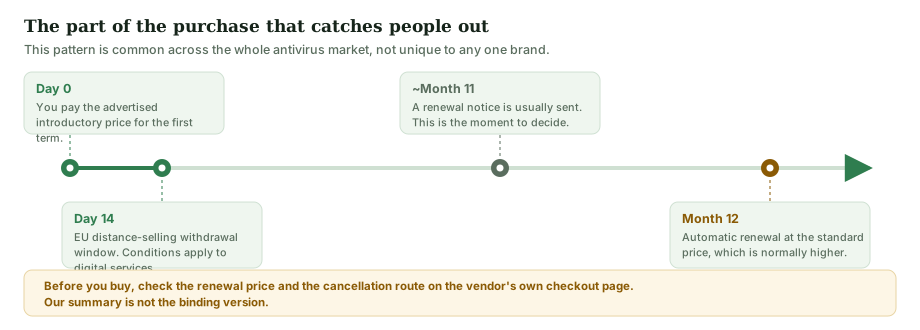
Four things to check on the vendor’s checkout page before you pay — and these apply to every vendor in the category:
- The renewal price, not just the first-year price. It is normally stated near the payment button or in the linked terms.
- How to turn automatic renewal off, and whether you can do it from the account dashboard or have to contact support.
- The refund window and the conditions attached to it.
- What the plan actually includes. The VPN and password manager are not always in the entry-level tier.
If you are buying from within the EU, you generally have a 14-day right of withdrawal on distance contracts under the Consumer Rights Directive (2011/83/EU). For digital content and services there are specific conditions — in particular, the right can be lost if you expressly consented to immediate performance and acknowledged that consent at checkout. The seller’s terms and your own national implementation govern; the European Commission’s Your Europe pages summarise the position.
Advertisement — we earn a commission on subscriptions bought through this link, and you pay no more for it. Read the renewal price and cancellation terms on the vendor's own checkout page before paying; those terms, not this page, are what you agree to.
10. Phishing: the attack the software cannot fully solve
Web filters in a security suite block pages that are already on a blocklist. That helps, and it is a real part of what you are paying for. But phishing campaigns are cheap to launch and short-lived, so a fresh fraudulent page frequently reaches its targets before any blocklist has heard of it. The remaining defence is recognising the message.
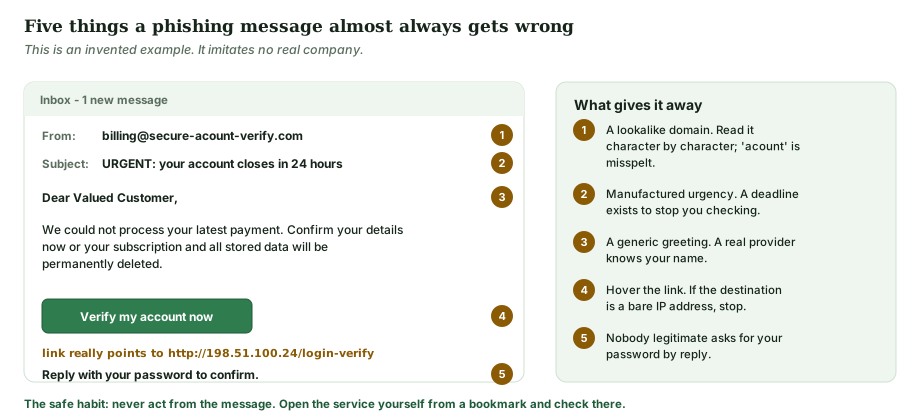
The single habit that defeats nearly all of it: never act from inside the message. If an email says there is a problem with an account, close it, open the service yourself from your own bookmark or by typing the address, and look for the problem there. If it is real, it will be waiting for you. If it is not, you have lost ten seconds.
11. Who this kind of product suits
| Situation | Is a paid suite likely to help? |
|---|---|
| Several devices in a household, shared by people with a range of technical confidence | Often yes. One subscription and one dashboard is genuinely easier than configuring each device separately. |
| You do not currently use a password manager | Yes, for that reason alone — though free and standalone password managers also exist. |
| You regularly use public or untrusted Wi-Fi | The VPN is useful, within the limits set out in section 5. |
| A single, careful user on an up-to-date Windows machine | Less clear-cut. Defender plus a password manager plus prompt updates covers most of it at no cost. |
| You want granular firewall rules, custom scan scheduling or centralised reporting | Probably not. Consumer suites are deliberately simplified; this is business-tier territory. |
| You are buying mainly for an iPhone or iPad | Understand what you are buying first. See section 8 — it is not virus scanning. |
12. How to check all of this yourself
- Read the current test round at AV-TEST, AV-Comparatives or SE Labs directly, and note its date. Do not rely on any vendor’s summary of a result, ours included.
- On Windows, open Windows Security and look at what is already switched on before you buy anything.
- On the vendor’s checkout page, find the renewal price before you find the payment button.
- Check the plan comparison table for which tier actually includes the VPN and the password manager.
- Look up the vendor’s own legal and refund pages. They are the binding document; this article is not.
13. Corrections to this article
This page replaced an earlier version that contained claims we could not substantiate. In line with our corrections policy, the changes are recorded here rather than made silently.
| Previously said | Why it changed |
|---|---|
| Headline: “Why It Beats the Competition” | An unsupported superiority claim. Replaced with a descriptive title. |
| “Why it keeps winning awards” | No award was named or dated. Removed. |
| “Independent testing labs have consistently ranked TotalAV among the top performers … often scoring 100% in real-world protection tests” | Not tied to any identified test round. Removed and replaced with an explanation of how to read the laboratories’ own published results. |
| “The optimisation module has been reported by users to noticeably improve boot times and free up several gigabytes of disk space” | No such user reports existed; the figure was invented. Removed, and replaced with a mechanical description of what clean-up tools do and cannot do. |
| “Protects up to 10 devices” and “the most popular plan covering up to 10 devices” | Device limits and tier structures change and we could not verify them. Readers are now directed to the vendor’s current plan page. |
| “Customer support is available 24/7 via live chat and email” | Unverified specific. Removed. |
| The VPN “adds a layer of anonymity” | Factually wrong and the most consequential error on the page. A VPN does not confer anonymity. Corrected at length in section 5. |
| The VPN is useful “for accessing geo-restricted content” | Removed. It encourages breaching third-party terms of service and was not relevant to security. |
| “Reader Stories” branding and “this is a reader-submitted story” | The page was not reader-submitted. The framing was false and has been removed site-wide. |
| Platform support given as “Windows, macOS and Android” | Incomplete and misleading, because it omitted the iOS case where scanning is not technically possible. Replaced with section 8. |
| “The free trial lets you test it on your own hardware” | A free tier and a time-limited trial of a paid tier are different things with different terms. Removed; readers are directed to the vendor. |
If you think something on this page is still wrong, write to info@sorentis.online and we will check it. Our correction procedure is described in the editorial policy.
14. Sources
- AV-TEST Institute — published consumer test rounds and methodology.
- AV-Comparatives — real-world protection and performance tests.
- SE Labs — consumer endpoint protection reports.
- AMTSO — the testing standard the laboratories above work to.
- ENISA — the EU agency for cybersecurity; its annual Threat Landscape report covers ransomware and phishing trends.
- Microsoft Windows security documentation — Microsoft Defender Antivirus, Controlled Folder Access, Storage Sense.
- Have I Been Pwned — breach-exposure lookup.
- European Commission, Your Europe — consumer withdrawal and refund rights.
- TotalAV — the vendor’s own site, for current plans, features, prices and terms. Where it differs from this page, it is correct and this page is not.
About the illustrations
All eight diagrams on this page were drawn specifically for this article as original SVG files. They contain no product screenshots, no company logos and no stock photography. Each one has a text description embedded in the file for screen readers.
Advertisement. Following this link and subscribing earns us a commission from the seller; it does not change your price. Check the plan contents, the renewal price and the cancellation terms on the vendor's own site before you pay.
Trademark and independence
TotalAV is a trademark of its respective owner. sorentis.online, operated by Central rbr s.r.o., is an independent publisher. It is not affiliated with, endorsed by, sponsored by, authorised by or in any way officially connected to TotalAV or to any other product or company named on this page. All other trademarks, service marks and trade names are the property of their respective owners and are used here for identification only.
This article is general consumer information, not professional security, legal or financial advice.